

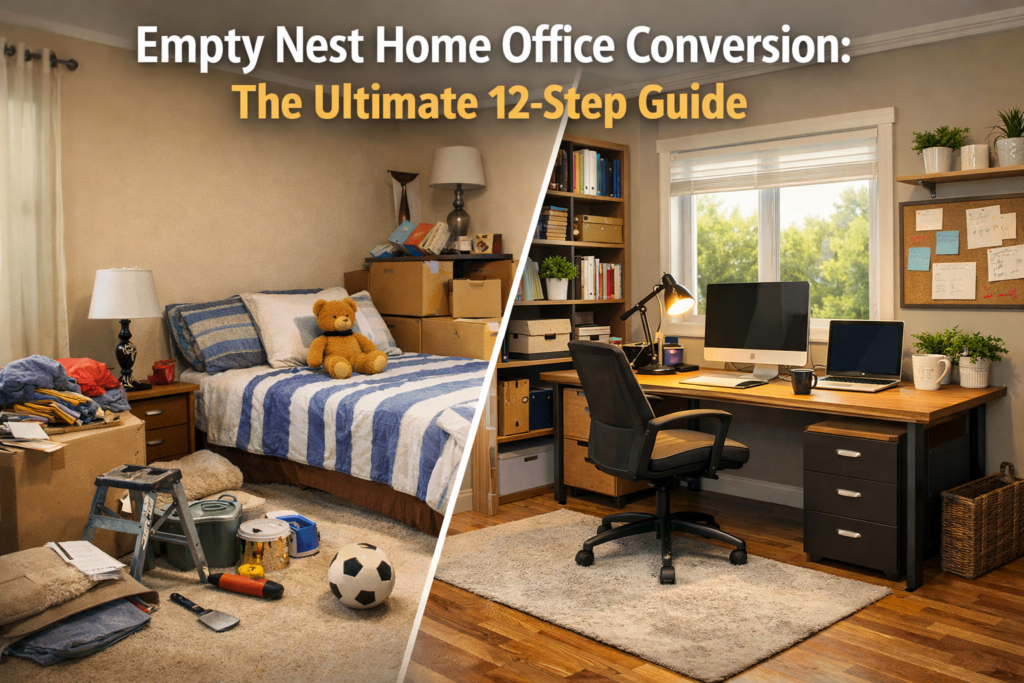
Hardware Upgrades: The Empty Nest Home Office Conversion
Refactoring the “Kid Cave” into a Professional-Grade Workspace (Phase 2.0)
Introduction: Reclaiming the Vacant Partition
For a software developer, few moments feel as satisfying as a clean install.
Think about it: A fresh Linux distribution booting for the first time. A factory-reset workstation with no lingering configuration files. A brand-new machine, powered on before a single bloated toolchain is installed. That moment—before entropy—represents possibility. No deprecated dependencies. No mystery background processes consuming memory. No “hacks” layered on top of other hacks that everyone is afraid to touch. Just raw potential.
For the last twenty years, one room in your house has been the exact opposite of that experience. It was a high-traffic, high-latency environment. It was a constantly mutating system filled with school projects, sports trophies, half-finished art supplies, musical instruments abandoned mid-phase, tangled chargers, and the ambient noise of a growing human life. It wasn’t messy by accident. It was alive. It was doing exactly what it was designed to do: raise a human being.
But that room wasn’t yours. It was a critical dependency in the architecture of your household. Then, one day, the migration happened. They moved out. There was no dramatic shutdown or “end process” dialog. Just a gradual reduction in usage, followed by a heavy, unsettling silence.
Now you’re standing in the doorway of what feels like a vacant partition. The posters are peeling. The carpet has absorbed decades of wear. The air feels oddly still—like a paused process that hasn’t yet been garbage-collected. The room exists, but it no longer has a defined role in the system.
For many parents, this space becomes emotionally complicated. It’s a “ghost process” that quietly consumes mental bandwidth just by existing. It’s a reminder that time passed while you were busy keeping everything running. But through the lens of Phase 2 of life—and through the mindset of a developer—this room is not a loss. It is the most valuable system resource you own.
This is where the empty nest home office conversion begins. In this guide, we will walk through the full architecture of an empty nest home office conversion. Not as a reaction to absence, not as a way to “fill the void,” but as a deliberate refactor of space, identity, and daily life. You’ve spent decades designing systems for others. Now it’s time to design one for yourself.
1. The Audit for Your Empty Nest Home Office Conversion
Processing this legacy data is the first step in resolving the [System Idle Crisis] I discussed in my last post. Before you install new hardware, you wipe the drive. This rule is universal in software engineering, and it applies just as strictly to an empty nest home office conversion. The challenge is that this “data” isn’t abstract; it’s personal.
You are not just clearing a room. You are interacting with a twenty-year archive of a life phase that is now complete. Trying to rush this step is the equivalent of installing a new operating system over a corrupted file system and hoping for the best. The issues won’t disappear; they’ll just surface later in more subtle, disruptive ways.
The Git-Based Decluttering Framework
Instead of attempting a single, emotionally exhausting “big clean,” approach the process like version control.
-
Archive (The Master Branch): These are the irreplaceable artifacts. Not everything old qualifies—only what still carries meaning now. First drawings, graduation photos, and handwritten notes. Archiving is not hoarding; it is acknowledging that some data is historically significant and should remain immutable.
-
Fork (Donate / Open Source): A large percentage of what fills a child’s room still has functional value—clothing, books, and sports equipment. Donating them allows the objects to continue serving a purpose instead of decaying in storage. Think of this as open-sourcing unused assets.
-
Delete (Garbage Collection): Then there’s the true junk—broken toys, outdated worksheets, and random debris. Systems that never delete eventually grind to a halt. Deleting is not erasing the past; it is reclaiming resources for the present.
2. Emotional Latency and the Cost of Ignoring the “Lag”
Expect latency during this phase. In networking, latency is the delay between a command and a response. In an empty nest home office conversion, you will open a drawer and find something that stops you cold. A drawing. A note. A handwriting style that no longer exists.
The Human Side: That pause is not inefficiency. It is processing. One of the biggest mistakes people make is treating emotional discomfort as a bug to be suppressed. They rush. They shove things into boxes. This creates “emotional technical debt.” Unprocessed feelings don’t disappear; they leak into your workspace later as distraction or a subtle sense that something feels “off.” Take the time to process what surfaces. Sit with it. Acknowledge it. Then move forward deliberately.
3. Identity Shift: From Caregiver to Architect
There’s a deeper reason this room feels heavy. For decades, your identity was partially defined by proximity. You were the on-call support engineer for another human being’s life. When that dependency disappears, the system doesn’t just free up resources—it destabilizes your identity.
The empty room isn’t just empty of furniture; it’s empty of purpose. That’s why converting it into a “miscellaneous” room often feels wrong. It doesn’t provide a new narrative.
A home office does. A workspace says:
-
This space matters again.
-
My time matters.
-
My work is not an afterthought.
This is not regression; it is re-architecture.
4. The Chassis: Choosing the Right Desk for Phase 2
In any physical computing system, the chassis determines stability, expandability, and lifespan. If the frame flexes or rattles, the entire system suffers. Your desk plays exactly this role.
For many years, your work surface was an afterthought. A dining table. A repurposed side desk. Something “good enough for now” that accidentally became permanent. Phase 2 demands a different mindset. This desk is no longer temporary infrastructure; it is load-bearing.
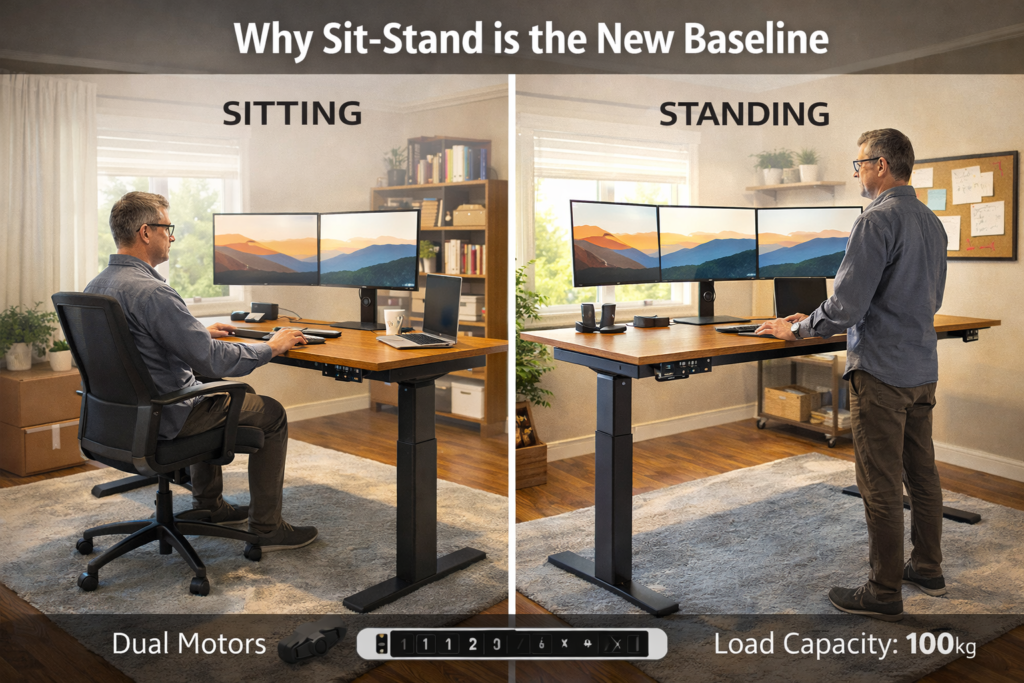
Why Sit-Stand is the New Baseline
By this stage of life, system uptime (your health) matters more than raw throughput. Extended sitting accelerates lower-back degradation and circulatory issues. A motorized sit-stand desk introduces movement without interruption.
The Specs for Success:
-
Dual Motors: Single motors struggle under the load of modern multi-monitor setups.
-
Memory Presets: Think of these like BIOS profiles—one for sitting, one for standing, perfectly calibrated to your height.
-
Load Capacity: Look for at least 100kg to ensure the desk feels “inert” and doesn’t wobble when you type.
5. The Ergonomic Patch: Your Physical Hardware
If the desk is the chassis, the chair is the operating system interface between your body and the machine. This is where many experienced professionals make a costly mistake: inheriting an old chair or assuming discomfort is “just part of the job.”
Why Gaming Chairs are a Deprecated Pattern
Gaming chairs look serious, but they are fundamentally misaligned with long-duration professional work. They are optimized for short bursts, not eight-hour sessions. Common failures include fixed lumbar support and seat pans that don’t accommodate actual human biomechanics.
What “Enterprise-Grade” Seating Actually Means
Your body is no longer running Version 1.0. This is not luxury hardware—it’s preventative maintenance.
-
Dynamic Lumbar Support: It should follow your spine’s natural curve.
-
Adjustable Seat Depth: Crucial to avoid pressure behind knees.
-
Breathable Materials: To manage heat during long sessions.
6. Visual UI: High-Performance Monitors and Real Estate
Your eyes are your primary input sensors. Poor visual ergonomics lead to “Visual Noise” and reduced focus.
Scaling Your Monitor Architecture
-
Ultra-Wide (34–49”): Ideal for side-by-side code and documentation. It reduces “bezel interruption”—that annoying gap in the middle of two screens.
-
Dual 27” 4K: Ideal for modular task separation. You can keep your primary project on one screen and your “logs” or communication tools on the other.
The Monitor Arm Rule: Monitor arms are not optional. They free up desk space, enable precise height alignment, and reduce neck strain. A fixed stand is a limitation you don’t need in your empty nest home office conversion.
7. Lighting as Cognitive Infrastructure
Lighting is often treated as decoration. That’s a mistake. Light directly affects eye fatigue, alertness, and mood stability.
The Three-Layer Lighting Model:
-
Task Lighting: Monitor light bars illuminate the desk without reflecting on the screen.
-
Bias Lighting: Soft light behind monitors reduces contrast strain.
-
Ambient Lighting: Avoid overhead glare. Indirect light is calmer and more consistent.
8. The Dual-Boot Strategy for an Empty Nest Home Office Conversion
One of the most emotionally charged decisions in an empty nest home office conversion is acknowledging a simple truth: Your kids no longer live here—but they will return for holidays and visits.
The mistake many make is designing the room primarily for guests. This sabotages the other 90% of the year. The correct approach is abstraction: Design for the primary user (you) and enable guest functionality without dismantling the system.
-
Murphy Bed (The Gold Standard): When closed, it disappears into cabinetry. It provides a real sleeping surface without requiring “furniture Tetris.”
-
High-End Sofa Sleeper: If a Murphy bed isn’t feasible, invest in one with an actual memory foam mattress.
-
The Golden Rule: Your desk should never need to move to accommodate a guest. Productivity should resume instantly after “guest mode” is disabled.
9. Network Infrastructure: Hardwiring for Stability
Wi-Fi is convenient, but it is not reliable enough for professional-grade work. Video calls and cloud backups demand minimal “jitter.”
-
Ethernet First: If you can run Cat6 cable from your router to the office, do it. This single decision improves stability more than almost any other upgrade.
-
Mesh as a Fallback: If wiring isn’t possible, place a node inside the office, not outside the door.
Reliable networking is not a luxury; it is baseline infrastructure. Dropped calls increase cognitive load and reduce confidence.
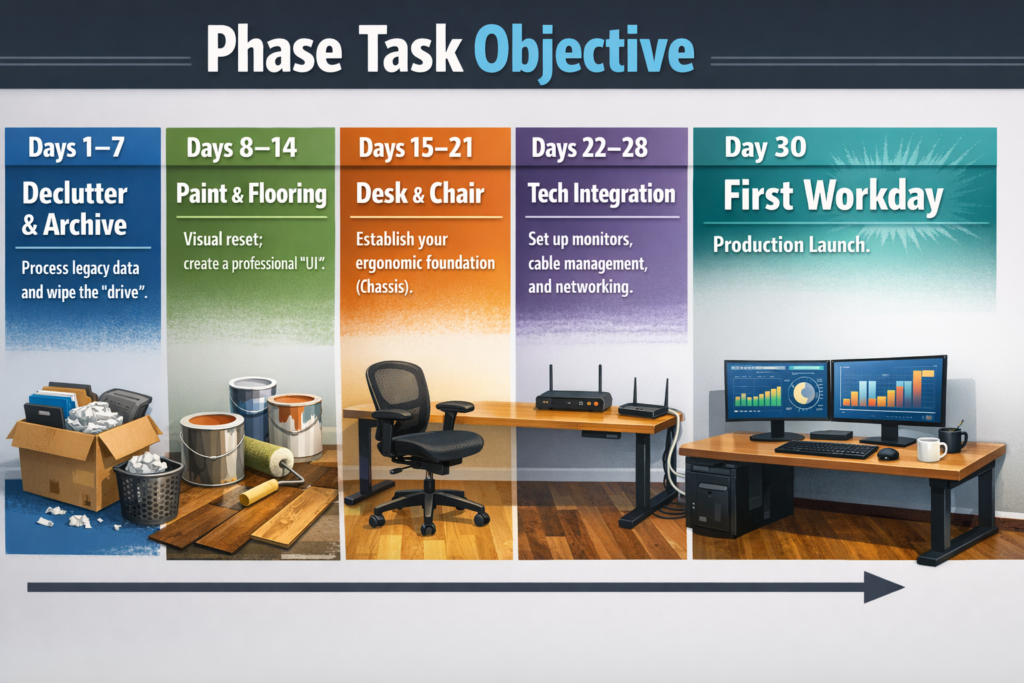
10. The 30-Day Empty Nest Home Office Conversion Checklist
Conclusion: Finalizing Your Empty Nest Home Office Conversion
The empty nest home office conversion is not a renovation project. It is a declaration.
You’ve spent decades building systems for others. You optimized schedules, absorbed interruptions, and deferred your own comfort because something else mattered more. That phase completed successfully.
Now, this room represents something different. It represents focus. It represents intention. It represents a system designed to support you. The hardware is installed. The infrastructure is stable. The ghost process of the past has been gracefully terminated. Now that your empty nest home office conversion is complete, it’s time to hit the next.
Welcome to Version 2.0. What are you going to build next?
